Google 'Ask Maps': When AI Picks the Shop Instead of Your Customer

Google Maps has a new feature called Ask Maps — you ask a question in plain language, the AI reads data from hundreds of millions of places, and it answers with a short list of specific shops. Which means the one choosing a shop for your customer is often no longer the customer. It's the AI. And the AI decides based on what you've published about your business on Google — not on how good your food or your nail work actually is.
Here's the plain-English version: what Ask Maps is, how it changes the way customers find you, and what to fix this week so you don't get left out.
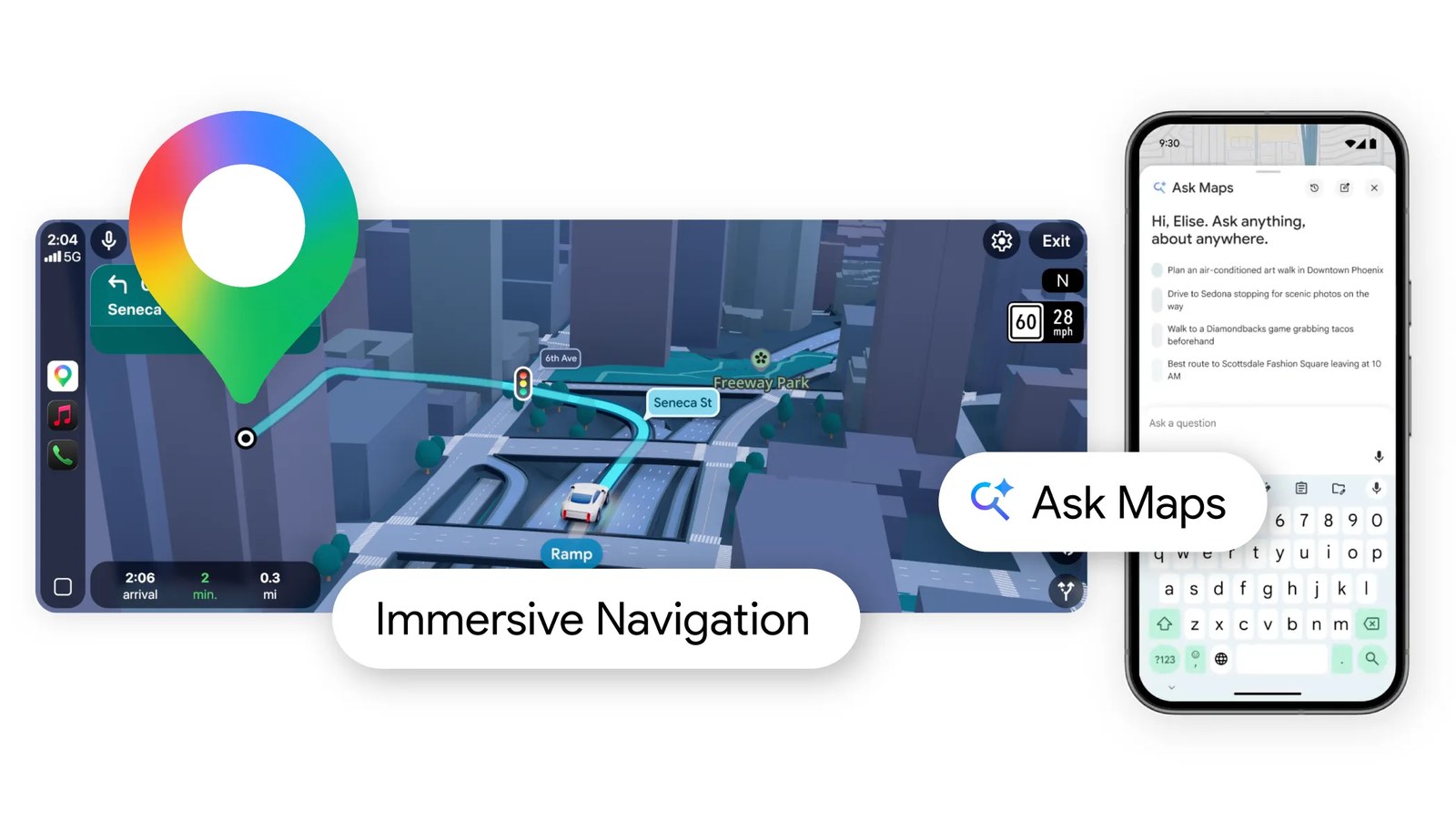
What is Ask Maps? The 30-second version
Until now, you opened Google Maps and typed something like "nail salon" or "pho". Google treated that as a category and dropped a pile of red pins on the map. Figuring out which one suited you was your job.
Ask Maps works differently. It's a conversation box built into Google Maps, running on Gemini (Google's AI). You type a full question the way you'd text a friend, and it understands and answers.
An easy way to picture it: the old search box was the Yellow Pages — you flip, you choose. Ask Maps is a friend who knows the neighbourhood. You describe your situation, they think about it, and they say: "Go here — it's quiet at that hour and parking is easy."
Google launched Ask Maps on March 12, 2026, starting in the U.S. and India. By August 2026 it had expanded to more than 150 countries — Canada included. So your customers in Toronto, Mississauga, Vaughan and Hamilton are already starting to use it.
Customers ask differently now, so Google answers differently
This is the most important part of the article. Read it slowly.
The old search box understood categories. Ask Maps understands situation + conditions + feel. Some real examples Google published:
- •"My phone is dying — where can I charge it without waiting in a long coffee line?"
- •"Is there a public tennis court with lights I can play on tonight?"
- •"My friends are coming from Midtown East to meet me after work. Any spots with a cozy aesthetic and a table for 4 at 7 tonight?"
That last one is the example in the screenshot below. Notice the customer stacked four conditions at once — direction of travel, time, party size, and "a cozy aesthetic" (which is a completely fuzzy thing). Google answers with a custom map showing only the places that satisfy all of it.
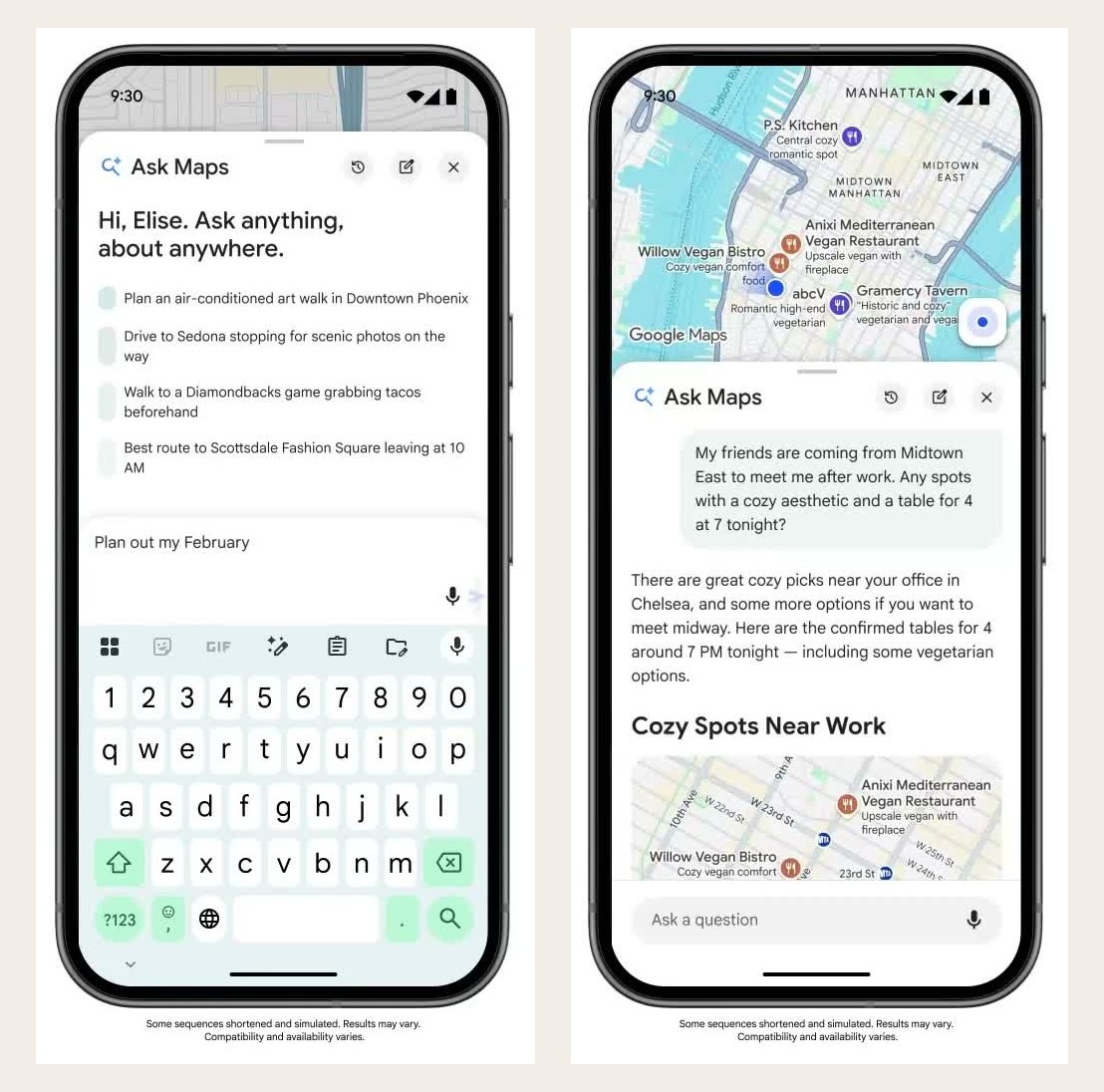
See the difference? Before, a customer typed "restaurant near me" and every nearby place got a shot at being seen. Now the customer asks a conditional question and the AI filters the list before the customer ever looks at it. If your shop doesn't match the conditions, you're eliminated before the race starts — and the customer never learns you exist.
Why this matters so much for your shop
Look closely at this screenshot. It's a real Ask Maps result:
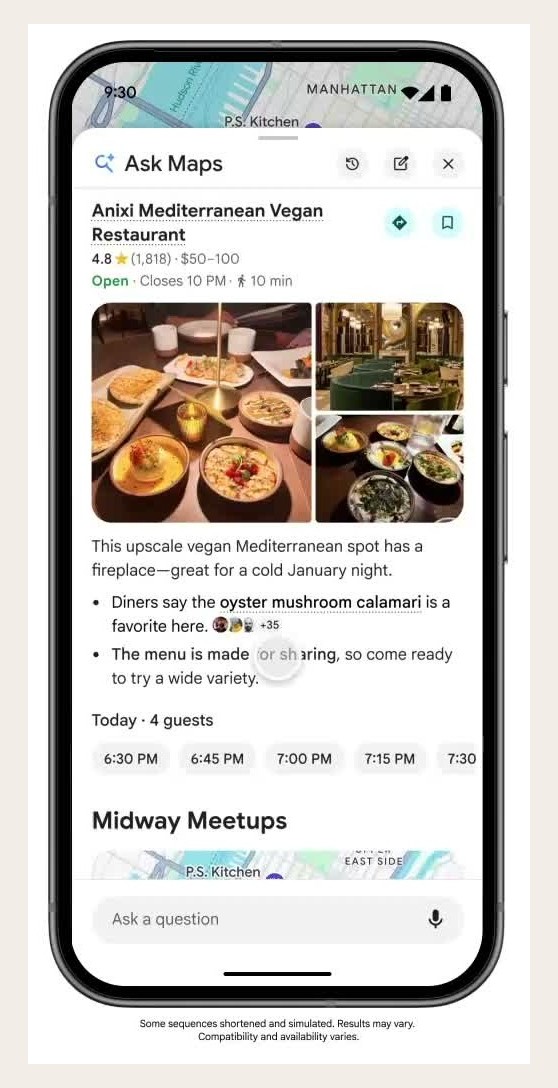
Count how many pieces of that business's information the AI used:
- •Rating and review count — 4.8 stars, 1,818 reviews
- •Price range — $50–100
- •Opening hours — open now, closes at 10 PM
- •Walking distance — 10 minutes
- •Photos — the food, the room
- •A detail about the space — "has a fireplace", good for a cold January night
- •A direct quote from customer reviews — "Diners say the oyster mushroom calamari is a favorite here"
- •Open reservation slots — 6:30, 6:45, 7:00, 7:15...
That leads to the single biggest lesson in this article:
The AI doesn't invent anything. It simply repeats what you and your customers have already put on Google. A thin profile gives it nothing to say — and when it has nothing to say about you, it recommends someone else.
The old formula for ranking on Google Maps was "close by + lots of stars". That's no longer enough. If your profile is just a name, a phone number and three blurry photos, then when a customer asks "which nail salon does dip powder, opens Sunday, and has parking?" the AI has no data to answer with — so it skips you, even though you offer all three in real life.
Where does the AI get its information?
Google says Ask Maps draws on more than 300 million places and contributions from over 500 million people. For a small shop like yours, that boils down to four sources:
1. Your Google Business Profile
Name, address, hours, business categories, service and menu lists — and especially the attributes section: those little checkboxes for parking available, wifi, wheelchair accessible, accepts cards, outdoor seating, languages spoken. Most owners leave these blank. They're exactly what the AI filters on.
2. Your reviews
Not just the star count — the AI reads the text and pulls quotes out of it, like the "oyster mushroom calamari" line in the screenshot above.
3. Photos
Your photos, customer photos, plus Street View and aerial imagery. Google specifically says Gemini analyzes real-world imagery to surface details that text alone doesn't capture — like whether there's patio seating, or how upscale the storefront looks.
4. Live data
When you're busy, when you're quiet, whether tables are still open.
6 things to do this week
Here's the practical part. Do these six things and you're already ahead of most shops on your street. All of them are free — they only cost time.
Step 1 — Fill in every attribute on your Google Business Profile. Open your profile, find the info/attributes section, and tick everything that's true. Don't skip the small ones. Every checkbox is one more condition the AI can match you on.
Step 2 — Fix your hours, holidays included. Ask Maps favours shops that are open at the moment the question is asked. Wrong hours means instant elimination. Set your special hours for Christmas, New Year and Tết too.
Step 3 — List your services and dishes in detail, by name. Don't write "nail services". Write gel manicure, dip powder, spa pedicure, nail art, waxing. Don't write "Vietnamese food". Write phở tái nạm, bún bò Huế, grilled pork bánh mì, Vietnamese iced coffee. The AI can only recommend names it can actually read.
Step 4 — Post fresh, real, well-lit photos. A few every month: the interior, the food, the storefront, the parking. Storefront photos matter more than you'd think — they help the AI (and the customer) recognize you.
Step 5 — Ask for reviews that name a specific dish or service. This is the best trick here. A review saying "Great place, 5 stars" is nearly useless to the AI. A review saying "Lan does beautiful dip powder, and they're open until 8 so I can come after work" is gold — because the AI can lift that sentence and show it to someone else. When a customer is happy, just say: "If you have a minute, mention the dish you had — it really helps us."
Step 6 — Reply to reviews, especially the bad ones. Short and gracious. It tells Google this profile is alive and looked after.
One important warning: don't stuff keywords into your business name, and never buy fake reviews. Google penalizes this hard, and the AI keeps getting better at spotting unnatural review patterns. Slow and honest wins.
What else can Ask Maps do?
Since the August 2026 update, Ask Maps doesn't just recommend — it acts on the customer's behalf:
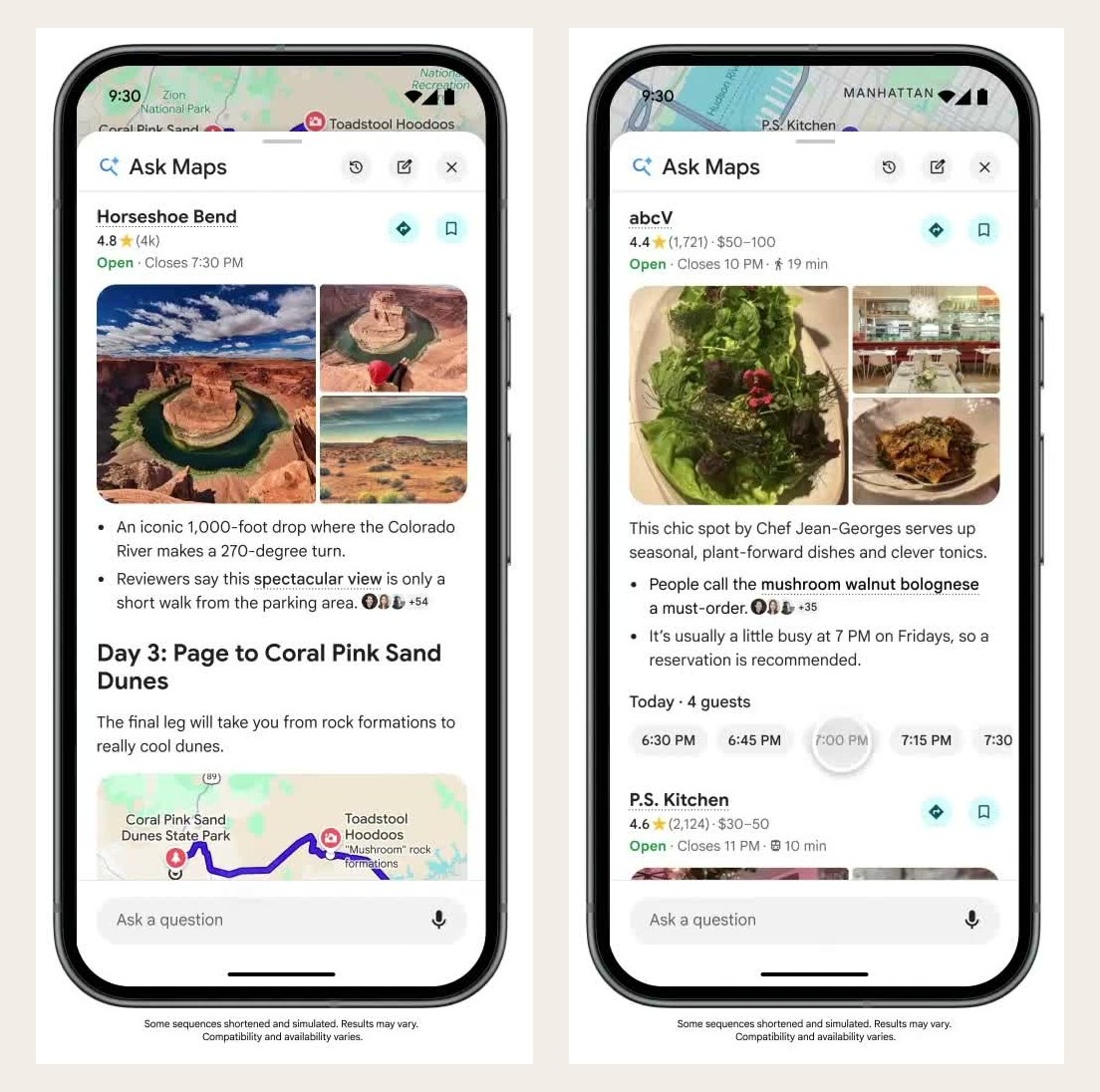
- •Plans whole trips — one question turns into Day 1, Day 2, Day 3 with maps and stops.
- •Books tables and orders takeout — connected to Square and Toast today, with Uber Eats coming.
- •Compares hotel prices and finds local events.
- •Remembers earlier chats — with History on, it picks up where the customer left off.
- •Reads Gmail (with permission) — ask "what should I do near my hotel before tomorrow's flight?" and it pulls the booking details itself.
- •Shows live transit for buses, trains and subways, with delay alerts.
The takeaway for you: if your shop takes online bookings or orders through a system Google can read, customers can book without ever leaving Maps. Fewer steps means fewer customers dropping off along the way.
Is it available in Canada? What about Vietnamese?
Yes, it's live. The March 2026 release was U.S. and India only, but the August 2026 update opened it up to Canada, Australia, Brazil, Japan, Mexico, Indonesia and 150+ other countries — on Android, iPhone and desktop.
On Vietnamese: Google announced this expansion in English. In practice, typing in Vietnamese does work and it answers in Vietnamese, but the quality may be less consistent than English. Try both.
A 2-minute test: open Google Maps, find the Ask Maps button (the magnifying glass with the sparkle), and type the exact question your customers ask — something like "which nail salon near me is open Sunday and takes walk-ins?". See whether you show up. And if a competitor shows up instead, look at what the AI is praising them for. That's your to-do list.
In short: what to do next
- •Google Maps now answers conditional questions with AI, not just keyword matches.
- •The AI picks shops based on the data you've published — attributes, hours, services, photos, reviews.
- •A thin profile gets eliminated before the comparison even happens, even if you're genuinely better.
- •This week: tick every attribute, fix your hours, name your services, post fresh photos, ask for specific reviews, reply to reviews.
Right now this is an opportunity. Most shops in our community don't even know Ask Maps exists yet. Whoever cleans up their Google profile today is the one the AI recommends over the next 6–12 months.
If you'd like someone to audit your Google profile and get it properly filled out, that's something Wizy.ca does every day for Vietnamese businesses across Ontario. Just send us a message.
References: Google Blog — Ask Maps and Immersive Navigation and 9to5Google — Ask Maps global rollout. Screenshots in this article are taken from Google's official announcement videos (Google notes that the demo sequences are shortened and simulated).
✍️ About the author: Do Ngoc Hoan Founder of Wizy.ca, a marketing agency for Vietnamese businesses in Ontario. I write to make marketing simple for busy shop owners — no confusing jargon. More at dongochoan.com.
Frequently Asked Questions
What is Google Maps' Ask Maps?+
Ask Maps is a Gemini-powered chat box built into Google Maps. Instead of typing a keyword like "nail salon", you ask a full conditional question — for example "which nail salon is open Sunday and has parking?" — and the AI reads data from over 300 million places and answers with a short shortlist plus a custom map. Google launched it on March 12, 2026.
Is Ask Maps available in Canada?+
Yes. The March 2026 launch covered only the U.S. and India, but in August 2026 Google expanded it to Canada, Australia, Brazil, Japan, Mexico, Indonesia and over 150 other countries, on Android, iPhone and desktop. Google announced the expansion in English, so answers to Vietnamese-language questions may be less consistent.
How does Ask Maps affect my ranking on Google Maps?+
The old "close by plus lots of stars" formula is no longer enough. The AI reads your attributes, hours, service list, photos and review text before deciding who to recommend. If your Google Business Profile is thin, the AI has nothing to match against the customer's conditional question, so it skips you — even if you actually meet every condition.
What should a shop owner do first to get recommended by Ask Maps?+
Start with three free tasks: tick every attribute on your Google Business Profile (parking, wifi, card payments, Sunday hours); correct your opening hours including holidays; and list your services or dishes by specific name instead of a generic category. Then ask happy customers to mention a specific dish or service in their review, because the AI quotes those sentences directly when recommending you.
Can Ask Maps book a table or order food for the customer?+
Yes. Since the August 2026 update, Ask Maps handles multi-step tasks such as reserving tables, ordering takeout (connected to Square and Toast today, with Uber Eats coming), comparing hotel prices and finding events. If your shop accepts online bookings through a system Google can read, customers can book without leaving Maps.
Related Posts


✉️ Subscribe to our newsletter
Marketing tips, AI news, and growth strategies for your business — straight to your inbox.